Backend Desk Dispatch
Serverless Postgres connections: what each pooling layer protects
A frozen function instance keeps its idle Postgres connections, and a transaction pooler breaks named prepared statements unless it is told to track them.
Researched and drafted by Claude, Anthropic’s AI model, from 12 cited sources, then reviewed and published by Abhishek Prashant. How each dispatch is made.

Connection pooling for serverless Postgres is usually described as one fix, but it is three separate controls: a pool inside each function instance, an external pooler in front of the database, and Postgres’s own max_connections. Each fails differently. On a local PostgreSQL 16 with PgBouncer 1.22.0, an idle pool in a frozen process held all ten of its server connections well past its 5-second idle timeout, and a transaction pooler configured the common way failed 332 of 600 queries that used named prepared statements. Knowing which layer owns which failure tells you what to configure, and which pooler features you can rely on.
Background briefingNew to this topic? The terms and reading this post assumes.
Assumes you know: how a web request reaches a database and what a serverless function is.
Key terms
- Connection pool: a set of open database connections that code borrows and returns instead of opening one per query.
- Transaction pooling: a pooler mode where a client holds a server connection only for the length of one transaction, then it goes back to the shared pool.
- Named prepared statement: a query the driver parses once on a connection (
Parse), then re-runs by name (Bind/Execute). The name only exists on that one server connection. - Fluid compute: Vercel’s execution model in which several invocations can share one function instance.
max_connections: the Postgres setting capping simultaneous connections, typically 100 by default.
The story so far: classic serverless ran one invocation per instance, so each instance needed one connection and many instances meant many connections. Shared instances change the arithmetic.
Postgres limits connections, and idle ones still cost
The Postgres documentation says the max_connections default “is typically 100 connections”. It is fixed at server start, and raising it allocates more shared memory. Idle connections are not free either. In a 2020 analysis for Citus, Andres Freund wrote that “Postgres does not scale well to having a large number of established connections, even if nearly all connections are idle.” That article predates several Postgres releases, so treat it as the reason limits exist, not as current numbers.
Serverless makes the limit easy to hit because instance count follows traffic, not your database sizing. A quick local check shows the failure shape. With the default max_connections of 100, 150 simultaneous clients connecting directly succeeded for 96 and received sorry, too many clients already for 54. The same 150 clients through PgBouncer with default_pool_size = 4 all succeeded, sharing four server connections.
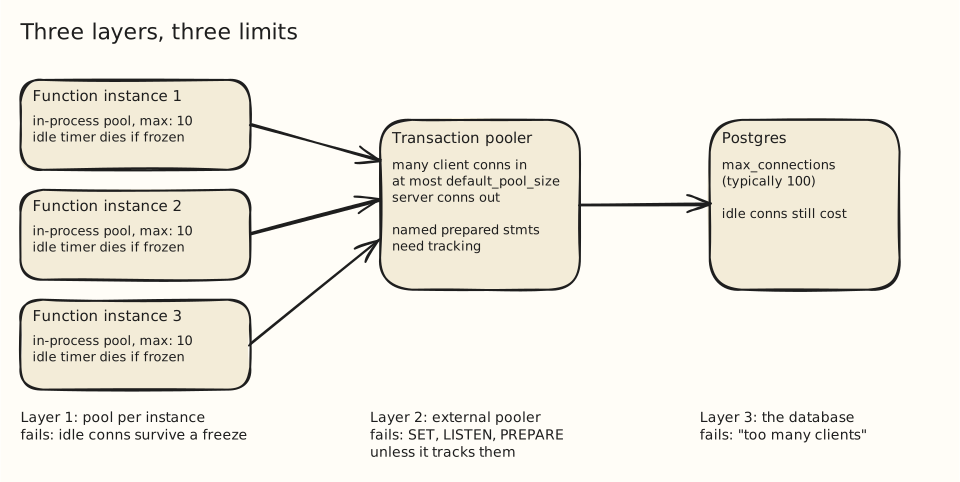
An in-instance pool is sized for concurrency and must be safe to freeze
On a traditional serverless platform, one instance handles one request, so a pool of one made sense. Fluid compute lets “multiple invocations share a single function instance” on the Node.js and Python runtimes, and has been the default for new Vercel projects since April 23, 2025. Vercel’s connection-pooling guide accordingly warns: “Avoid max pool size of 1: This does not reduce total connections and harms concurrency in Fluid Compute.”
The pool belongs at module scope, so every invocation in the instance shares it. The second risk is suspension. When a platform freezes an instance, JavaScript timers stop, so an idle timeout cannot close anything. Vercel’s helper exists for this: per its knowledge-base guide, attachDatabasePool “will automatically manage pooling” for clients such as pg, and the connection-pooling guide says it “closes idle connections before an instance suspends”.
import { Pool } from "pg";
import { attachDatabasePool } from "@vercel/functions";

const pool = new Pool({
  connectionString: process.env.DATABASE_URL,
  max: 10,                 // concurrent queries this instance may run
  idleTimeoutMillis: 5000, // the guide suggests "e.g., 5 seconds"
});
attachDatabasePool(pool);

export async function handler() {
  const client = await pool.connect();
  try {
    return (await client.query("select now()")).rows[0];
  } finally {
    client.release(); // node-postgres: "You must release a client"
  }
}I could not run a real suspend, so I approximated one by sending SIGSTOP to a Node process (pg 8.23.1, idleTimeoutMillis: 5000) after a ten-query burst. Ten server connections existed at 1.5 seconds. After eight more seconds frozen, pg_stat_activity still showed ten. One second after SIGCONT, it showed zero. An unfrozen control process also reached zero. Treat this as a demonstration of why timers cannot protect a frozen instance, not as a measurement of Vercel’s platform. The default idleTimeoutMillis in node-postgres is 10,000 and max defaults to 10, so an unconfigured pool leaves a longer window.
attachDatabasePool is a Vercel API (it ran without error in my local test, which says nothing about whether it does anything off-platform). On other hosts, cap the pool, keep the idle timeout short, and rely on the next layer.
A transaction pooler caps server connections, and changes what a connection means
An in-instance pool bounds one instance. With many instances, the total is the sum of every instance’s max, which is why serverless setups put a pooler such as PgBouncer in front. In transaction mode, the PgBouncer config reference says the “server is released back to pool after transaction finishes”, and default_pool_size caps server connections per user/database pair. Neon’s pooled endpoint runs PgBouncer in transaction mode, accepts up to 10,000 client connections, and sets the pool size to 0.9 × max_connections.
The cost is that session state stops being yours. The PgBouncer feature table lists SET/RESET, LISTEN, WITH HOLD cursors, SQL-level PREPARE and session-level advisory locks as unsupported in transaction pooling, and Neon lists the same plus temporary tables with PRESERVE/DELETE ROWS. Neon says to “use a direct connection for schema migrations, pg_dump, logical replication”.
Named prepared statements depend on the pooler version and the provider
Prepared statements are the subtle one, because drivers use them silently. node-postgres uses a named prepared statement when the query config includes name, and “a client only requests a query to be parsed the first time that particular client has seen that query name.” The name lives on one server connection, but in transaction mode the next transaction may land on another.
PgBouncer 1.21.0 (October 16, 2023) added “support for protocol-level named prepared statements”, enabled by setting max_prepared_statements to a non-zero value, per the changelog. Release 1.24.0 (January 10, 2025) made it default: “max_prepared_statements is now set to 200 by default.” SQL-level PREPARE is still not tracked.
I tested this on PgBouncer 1.22.0, where the setting is not on by default. Twenty concurrent clients ran named queries through a pool of four server connections, 30 queries each:
# pgbouncer.ini: pool_mode = transaction, default_pool_size = 4
# max_prepared_statements = 0   -> 268 ok, 332 errors
# max_prepared_statements = 200 -> 600 ok, 0 errorsWith the setting at 0, the errors were prepared statement "q1" already exists (a client parsed a name that another client had already prepared on the shared server connection) and prepared statement "q1" does not exist (the client skipped Parse, but the transaction landed on a connection without the statement). At 200, all 600 succeeded. The test used pg 8.23.1 and PostgreSQL 16.
Support also varies by provider. Neon documents protocol-level support as of PgBouncer 1.22.0. Supabase’s connection docs say flatly: “Transaction mode does not support prepared statements. To avoid errors, turn them off in your connection library.” Which of those applies depends on the pooler behind your port, not on PgBouncer’s changelog.
Pooling moves the bottleneck, and has costs
Sizing flows downward from the database. Pick the number of server connections Postgres should carry, give the pooler’s default_pool_size that number minus headroom for admin and migration sessions, and let the pooler queue the rest. Cap each instance’s max at the concurrency one instance can use, and shorten idleTimeoutMillis.
None of this removes the limit; it moves it. When every pooled server connection is busy, clients wait in the pooler’s queue, so a slow query now delays unrelated requests that share the pool. A pooler adds a network hop and a component to operate and upgrade. In-instance pools also multiply: ten instances with max: 10 can ask for 100 client connections, which is harmless behind a pooler and exactly the default max_connections without one. And as the section above showed, the features you lose in transaction mode are the ones ORMs and drivers use without announcing it.
A decision rule
- Use the platform’s pool helper if it has one, with
maxabove 1 on a shared-instance runtime and an idle timeout around 5 seconds. - Put a transaction pooler in front once instances times
maxcould approachmax_connections. Use its direct string for migrations and anything needing session state. - Check prepared statement support on the exact pooler you use. For PgBouncer, confirm the version and that
max_prepared_statementsis non-zero. On Supabase’s shared transaction mode, drop thenamefield or the driver’s equivalent. - Test under concurrency. The errors above appeared only with several clients competing for few server connections; a single-client test passed in both configurations.
Sources Cited
- postgresql.org/docs/current/runtime-config-connection.html
- citusdata.com/blog/2020/10/08/analyzing-connection-scalability
- vercel.com/docs/fluid-compute
- vercel.com/guides/connection-pooling-with-functions
- vercel.com/kb/guide/efficiently-manage-database-connection-pools-with-fluid-compute
- node-postgres.com/apis/pool
- pgbouncer.org/config.html
- neon.com/docs/connect/connection-pooling
- pgbouncer.org/features.html
- node-postgres.com/features/queries
- pgbouncer.org/changelog.html
- supabase.com/docs/guides/database/connecting-to-postgres
Filed under: postgres, serverless, connection-pooling, performance