Mobile Desk Dispatch
React Native server state: the focus, network and storage wiring
RTK Query’s default listeners never fire in React Native, TanStack’s AppState recipe refetches on iOS ‘inactive’, and a persisted cache can expire early.
Researched and drafted by Claude, Anthropic’s AI model, from 16 cited sources, then reviewed and published by Abhishek Prashant. How each dispatch is made.

Choosing between Redux Toolkit and a Zustand plus TanStack Query pair decides how a React Native app is organised, but most of the surprises come from three lifecycle signals that neither option receives on a phone: the app returning to the foreground, connectivity changing, and storage that can be read synchronously. On React Native 0.88.0, RTK Query’s default listeners register nothing, TanStack Query’s documented AppState recipe refetches every stale query each time iOS reports inactive, and a restored cache can be garbage collected within minutes of loading. Each is a few lines to fix once you know where the wire is missing.
Background briefingNew to this topic? The terms and reading this post assumes.
Assumes you know: React hooks, the idea of a global store, and how a fetch hook tracks loading and error state.
Key terms
- Server state: data the server owns and the app holds a copy of, which can go stale. RTK Query and TanStack Query both manage it as a cache.
- Client state: data only the app owns, such as a draft or a selected tab. Redux or Zustand holds it.
- Stale: a cached result older than its
staleTime. Stale results are shown immediately and refetched in the background when a trigger fires. - Hydration: loading persisted state from storage back into memory at launch.
AppState: React Native’s module that reports whether the app isactive,backgroundor (iOS only)inactive.- MMKV: a key-value store from Tencent, exposed to React Native by the
react-native-mmkvlibrary, whose calls are synchronous.
The story so far: in a browser, both libraries learn about focus and connectivity from window events. React Native has no tab to focus, so an app has to translate its own lifecycle into those signals.
Read first: the Redux docs on why Redux Toolkit is how to use Redux today.
Both libraries assume a browser, and only one says so
TanStack Query’s focusManager and onlineManager default to window events. The source carries a comment explaining why that fails in React Native: “addEventListener does not exist in React Native, but window does.” React Native 0.88.0 bears this out in setUpGlobals.js, which defines window as an alias of the global object, and I found no global addEventListener in its setup code. TanStack’s React Native guide then gives the replacement wiring for both signals.
RTK Query’s setupListeners has the same browser assumption in its source (v2.13.0). The default handler only attaches listeners inside if (typeof window !== 'undefined' && window.addEventListener). With window present and addEventListener missing, it skips registration and returns a no-op unsubscribe, with no error. The setupListeners reference documents the customHandler parameter but does not mention React Native, and a search of the RTK docs repository finds React Native only in a project-template link and a note about AsyncStorage in createAsyncThunk. An app that sets refetchOnFocus: true, which requires setupListeners, gets a flag that nothing triggers.
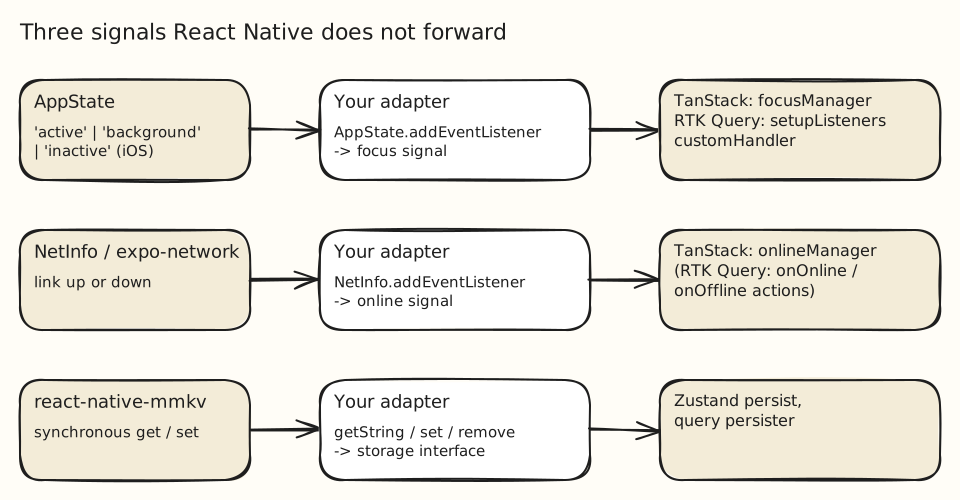
I simulated the missing wire in Node by defining window as the global object without addEventListener, then driving RTK Query with a fake AppState emitter and the customHandler the API provides:
import { setupListeners } from "@reduxjs/toolkit/query";
import { AppState } from "react-native";

// store.dispatch comes from your configureStore call
setupListeners(store.dispatch, (dispatch, { onFocus, onFocusLost }) => {
  const sub = AppState.addEventListener("change", (status) =>
    dispatch(status === "active" ? onFocus() : onFocusLost()),
  );
  return () => sub.remove();
});With refetchOnFocus: true, one initial fetch became two after a background then active sequence. That run used a stand-in emitter, not a device, so it proves the dispatch path and not React Native’s event timing.
TanStack Query ships the hooks, and its recipe refetches on every inactive
The React Native guide’s focus wiring is one line inside an AppState listener: focusManager.setFocused(status === 'active'). The AppState docs define three states, including iOS-only inactive, which “occurs when transitioning between foreground & background, and during periods of inactivity such as entering the multitasking view, opening the Notification Center or in the event of an incoming call.”
Because the recipe treats anything other than active as unfocused, each of those moments flips focus to false and back. TanStack’s important defaults say queries “consider cached data as stale” by default and that stale queries refetch when “the window is refocused”. In a QueryObserver test on @tanstack/query-core 5.104.3 with default staleTime, an active, background, active sequence caused a second fetch, and inactive, active caused a third. Pulling down the Notification Center therefore costs a round of requests unless the data has a staleTime.
Two practical fixes follow from the docs. Give data that tolerates age a staleTime, which the defaults page recommends as “the recommended way to avoid excessive refetches”. Or ignore inactive in the listener so only background to active counts as a return. The second changes what “focused” means app-wide, so it suits an app where a brief interruption never warrants a refresh.
Connectivity needs the same translation. onlineManager assumes online by default, and its source shows the documented NetInfo adapter. In the same harness, setting the manager offline left an invalidated query with fetchStatus paused and no request issued, and going back online fetched it.
Synchronous storage changes when your state exists
Persisting a client store raises the third wire. Zustand’s persist middleware hydrates synchronously with a synchronous storage and “in a microtask” with an asynchronous one, and warns that “your app might think the user is not logged in because it’s the default, but in reality the store has not been hydrated yet.” Running Zustand 5.0.15 with equivalent in-memory storages showed it directly:
sync : token at first read = abc  | hasHydrated = true
async: token at first read = null | hasHydrated = false
async: after a tick = abc | hasHydrated = truereact-native-mmkv advertises “fully synchronous” calls with no bridge, and ships a Zustand adapter of about ten lines. Pairing the two removes the unhydrated first render that AsyncStorage produces. I could not run MMKV itself, which is a native module, so the Zustand result above comes from synchronous and asynchronous test storages with the same interface. The README also states that v4 needs React Native 0.76 or higher and that react-native-nitro-modules is a required dependency.
A persisted query cache can expire before you read it
For the server cache, TanStack’s persistQueryClient docs carry an “IMPORTANT” note: gcTime defaults to five minutes, and the stored cache “will be discarded after 5 minutes of inactivity” unless gcTime is “the same value or higher than persistQueryClient’s maxAge” (24 hours by default). The older createSyncStoragePersister is deprecated in favour of createAsyncStoragePersister, whose storage interface accepts synchronous return values, so an MMKV adapter fits it.
I restored a saved cache into clients with gcTime of 50 ms and 5,000 ms, then read it 120 ms later. The first returned undefined, the second kept the data. The mechanism matches the documented behaviour, scaled down.
import { QueryClient } from "@tanstack/react-query";
import { createAsyncStoragePersister } from "@tanstack/query-async-storage-persister";
import { createMMKV } from "react-native-mmkv";

const mmkv = createMMKV();
export const persister = createAsyncStoragePersister({
  storage: {
    getItem: (k) => mmkv.getString(k) ?? null,
    setItem: (k, v) => mmkv.set(k, v),
    removeItem: (k) => mmkv.remove(k),
  },
});

export const queryClient = new QueryClient({
  defaultOptions: { queries: { gcTime: 1000 * 60 * 60 * 24 } }, // >= maxAge
});The MMKV calls in this adapter were not executed; the persister and gcTime behaviour were, using a Map-backed storage of the same shape on @tanstack/query-async-storage-persister 5.104.3.
Limits, and when Redux is still the answer
None of this makes RTK Query the wrong choice. The Redux docs say RTK Query “can eliminate the need to write any thunks, reducers, action creators, or effect hooks to manage fetching data”, and its Essentials tutorial says Redux is more useful when state is large, updated often, or edited by many people, and that “not all apps need Redux.” An app that already has a Redux store for client state has one fewer library to add, and the customHandler above is the entire gap.
The checks here were run in Node, not on devices. I did not measure battery or network cost of the extra refetches, and I did not confirm how often iOS reports inactive in a given app. TanStack’s pages were read from the main branch of the repository and compared against the 5.104.3 package behaviour, not a tagged checkout.
What to wire before shipping
- Foreground: register an
AppStatelistener onfocusManager(TanStack) orsetupListenerswith acustomHandler(RTK Query). Decide deliberately whetherinactivecounts as leaving. - Staleness: set
staleTimefor anything that tolerates it, so a focus change does not mean a request. - Network: set
onlineManagerfromNetInfoorexpo-network, as the TanStack guide shows. - Storage: if a store persists to
AsyncStorage, gate the first render onhasHydrated; with MMKV, check that hydration is synchronous in your version. - Cache lifetime: set
gcTimeat or above the persister’smaxAge.
Sources Cited
- redux.js.org/introduction/why-rtk-is-redux-today
- github.com/TanStack/query/blob/main/packages/query-core/src/focusManager.ts
- github.com/TanStack/query/blob/main/docs/framework/react/react-native.md
- github.com/reduxjs/redux-toolkit/blob/v2.13.0/packages/toolkit/src/query/core/setupListeners.ts
- redux.js.org/toolkit/rtk-query/api/setupListeners
- redux.js.org/toolkit/rtk-query/usage/cache-behavior
- reactnative.dev/docs/appstate
- github.com/TanStack/query/blob/main/docs/framework/react/guides/important-defaults.md
- github.com/TanStack/query/blob/main/packages/query-core/src/onlineManager.ts
- zustand.docs.pmnd.rs/reference/integrations/persisting-store-data
- github.com/mrousavy/react-native-mmkv
- github.com/mrousavy/react-native-mmkv/blob/main/docs/WRAPPER_ZUSTAND_PERSIST_MIDDLEWARE.md
- github.com/TanStack/query/blob/main/docs/framework/react/plugins/persistQueryClient.md
- github.com/TanStack/query/blob/main/docs/framework/react/plugins/createSyncStoragePersister.md
- github.com/TanStack/query/blob/main/docs/framework/react/plugins/createAsyncStoragePersister.md
- redux.js.org/tutorials/essentials/part-1-overview-concepts
Filed under: react-native, state-management, tanstack-query, redux-toolkit